See ClubForge in action.
Take a look inside the tools club administrators use to manage members, run tournaments, publish results, and keep the club connected.
Keep the club roster useful—not just stored.
Member contact information, roles, Handicap Indexes, roster status, and account access stay together. Administrators can quickly see who is active and when handicap information was last refreshed.
- Manage members and club roles in one roster
- See handicap freshness at a glance
- Import or maintain membership without duplicate lists
A clear path through tournament day.
Assignments, teams, handicaps, flights, scoring, prize administration, and reports stay in one guided workflow. Administrators can see what is complete, what is locked, and what needs attention next.
- One tournament record from setup through results
- Guided stages reduce missed steps
- Built-in status cues keep volunteers oriented
Build the field, then see exactly where everyone goes.
ClubForge supports tee times, shotgun starts, and manual groups. Capacity, assigned players, open positions, and finalized layouts are visible before the event moves forward.
- Generate groups from the registered field
- Review capacity and unassigned players before finalizing
- Keep assignment corrections controlled after play begins
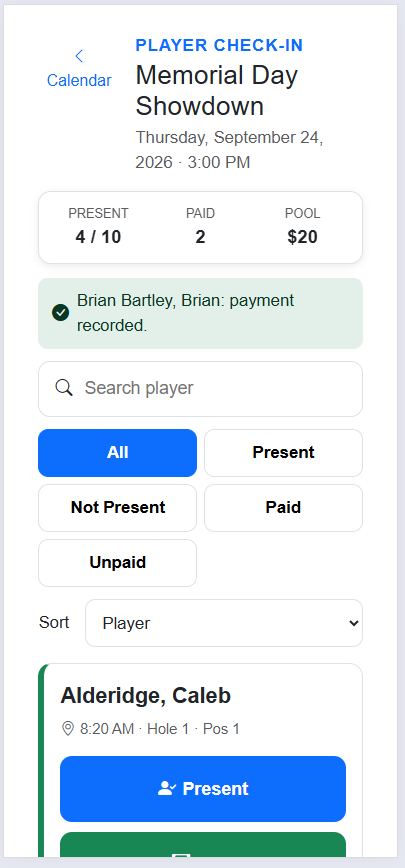
Tournament-day tools work where the volunteers are.
Check players in, record payments, search the field, and filter by attendance or payment status. The same workflow is designed to remain practical on a phone at the check-in table.
- Track present/not-present and paid/unpaid status
- See tee time, hole, and position with each player
- Phone-friendly controls for tournament-day use
Results stay connected to the event that produced them.
ClubForge carries the tournament through score entry, review, standings, and finalized results without moving the club into another system.
- Gross and net results in the same workflow
- Flights, teams, contests, and payouts stay connected
- Member-facing results are designed for desktop and mobile
Manage the public website without leaving ClubForge.
Administrators can manage the site header, homepage, pages, presentation style, and public publishing from the same application that runs the club.
- Preview and publish club-managed content
- Choose a presentation style without rebuilding the site
- Connect public pages to the club's operational data
Communicate from the same place you manage the club.
Club administrators can communicate with members without maintaining another disconnected address list or switching to a separate club-management tool.
- Reach all members or selected groups
- Use the current ClubForge roster as the source
- Keep communication tools close to club operations
Handicaps, flights, prize pools, reports, bulletins, billing, and more.
The tour is intentionally selective. ClubForge brings the recurring administrative work of a golf club into one connected platform.